Wireless 75% Hot-Swap RGB Keyboard: Clean, Fast Setup
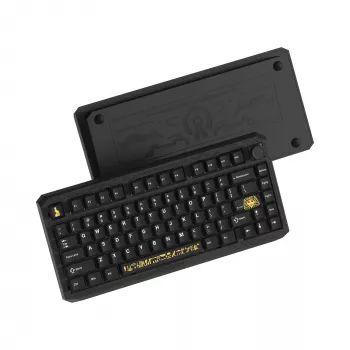
Wireless 75% Mechanical Gaming Keyboard with RGB & Hot-Swap Design
A 75% wireless mechanical keyboard hits a sweet spot: it clears desk space like a compact board, but keeps the function row and the keys most players and multitaskers rely on. Add hot-swap sockets and you get easy switch changes without soldering—ideal for dialing in a faster, quieter, or more tactile feel over time. With RGB lighting on top, the result is a clean setup that still feels purpose-built for quick inputs, late-night sessions, and everyday typing comfort.
What a 75% layout adds to a gaming setup
A 75% layout trims the width compared with a full-size keyboard while keeping the function row and a practical navigation cluster. That little reduction can make a noticeable difference when you play at lower sensitivities in FPS titles or prefer a wide mousepad—more mouse room means fewer bumps into the keyboard edge mid-fight.
Wireless connectivity also helps keep the desk visually clean. Fewer cables across the front edge of the desk can make it easier to reposition your keyboard for different games, rotate it slightly for comfort, or pack it up for travel. And unlike ultra-compact layouts, a 75% board stays work-friendly: arrow keys, F-keys, and essential navigation keys remain within easy reach for spreadsheets, editing, and shortcuts.
Wireless performance and connection options to look for
Wireless keyboards are often purchased for convenience, but gaming and fast-paced work benefit most from stability and consistency. In real-world play, low-latency behavior and solid polling matter more than maximum range. Your environment matters too—crowded 2.4 GHz spaces can affect any wireless device, so thoughtful placement (closer receiver, fewer obstructions) can help keep the connection steady.
Wired mode is still worth having even on a wireless-first board. It’s useful for firmware updates, sessions where you want zero interference, and times when you’re charging. If the keyboard supports multi-device switching, that’s a major quality-of-life upgrade: swapping between a PC, laptop, and tablet without re-pairing can turn one keyboard into the hub for an entire workspace. For background on device communication standards, the Bluetooth Core Specification and the USB HID overview are useful references.
Hot-swap design: fast customization without soldering
Hot-swap sockets let you pull switches and install new ones in minutes. That flexibility is ideal if you’re still figuring out whether you prefer linear switches for smooth, rapid key presses, tactile switches for a clear bump at actuation, or clicky switches for maximum feedback. It’s also practical maintenance: if a key ever becomes inconsistent, replacing a single switch is far easier than disassembling and soldering.
Hot-swap customization becomes even more noticeable when paired with stabilizer tuning. Spacebar, Enter, Shift, and Backspace can feel and sound dramatically better with simple adjustments (proper seating, lubrication where appropriate, or upgraded stabilizers). For a deeper primer on switch types and how they differ, Keyboard University’s mechanical switch guide is a solid starting point.
RGB lighting that stays usable during gameplay
Per-key RGB isn’t just decoration when it’s set up thoughtfully. It can improve visibility and make key clusters easier to recognize at a glance—movement keys, ability binds, push-to-talk, or macro rows can each get their own color. That small clarity boost helps in games with lots of inputs, especially in dim rooms.
Brightness and effects do have a trade-off: battery life. Static colors or subtle effects typically last longer than high-brightness animations. If software is supported, look for profiles that can be saved to the keyboard so your lighting and key behavior can travel with you across devices. For readability, shine-through keycaps and consistent legends matter more than flashy patterns—if the letters aren’t clear, RGB quickly becomes distraction instead of utility.
Build feel: plate, case, and acoustics
Build quality shows up most during long sessions. A solid case reduces flex and helps the keyboard feel stable when you’re pressing keys rapidly or resting your hands heavily. The plate material and mounting style influence both sound and bottom-out feel—some builds lean higher-pitched and crisp, others deeper and more muted, and some land in a softer “cushioned” feel depending on how the internals are designed.
Setup checklist for a smooth first week
Quick specs at a glance
| Feature | What it means for daily use |
|---|---|
| 75% layout | More compact than full-size while keeping function keys and arrows for games and productivity |
| Wireless connectivity | Cleaner desk setup and easier portability; keep wired mode available for charging or zero-interference sessions |
| Hot-swap sockets | Switches can be changed without soldering to tune feel and sound |
| RGB lighting | Improves visibility and personalization; brightness/effects can affect battery life |
| Mechanical switches | More consistent actuation and choice of feel (linear/tactile/clicky) compared with membrane keyboards |
Who this keyboard fits best
In-stock picks
- Wireless 75% Mechanical Gaming Keyboard with RGB & Hot-Swap Design
- Dr. Martens Women’s Black Leather Lace-Up Shoes
- AGOLDE Baggy V-Waist Jeans – Relaxed Fit with Streetwear Edge
FAQ
Does hot-swap work with any mechanical switch?
Compatibility depends on the socket type (commonly MX-style) and the switch pin configuration (3-pin vs. 5-pin). Some keyboards accept both, while others may require clipping plastic legs on 5-pin switches if the PCB only supports 3-pin.
Is wireless good enough for competitive gaming?
Wireless can perform well when the connection is stable and interference is managed, but crowded wireless environments can affect consistency. For tournaments or high-interference setups, using wired mode can be a reliable fallback.
How can RGB be used without draining the battery quickly?
Lower brightness, choose static or low-motion effects, and set sensible sleep timers so lighting turns off when idle. If profiles can be saved to the keyboard, store a “game” preset and a dimmer “work” preset to reduce unnecessary brightness.









Leave a comment